
Flow Coach: Understand Every Salesforce Flow in Your Org
Connect your Salesforce org and get instant insight into all your flows. With AI explanations in plain language, complexity scores, and educational learning signals.
What is Flow Coach?
Flow Coach is a tool within the CRM Force training platform that helps you understand all Salesforce Flows in your org. No technical documentation, but clear explanations in plain language — so you know what's happening.
The tool automatically analyzes every Flow: what triggers it, what does it actually do, and where are the potential pitfalls? This is presented with a complexity score and educational 'learning signals' that help you grow as an admin.
Flow Coach is designed for admins, key users, and internal consultants who want to gain control of the automations in their Salesforce environment — without having to be a specialist themselves.
The Problem: Too Many Flows, Too Little Understanding
In many Salesforce organizations, the number of Flows grows rapidly. What starts with a few handy automations can grow within a year to dozens — sometimes more than a hundred — Flows. And then it gets difficult:
- Nobody knows exactly what each Flow does
- Documentation is missing or outdated
- Flows were created by consultants who have since left
- When problems occur, it's like finding a needle in a haystack
- New team members need weeks to understand the automations
This is exactly what Salesforce maturity is about: organizations that have control over what's happening in their environment, independent of external knowledge.
"If only the external consultant knows how your automations work, you're not mature — you're dependent."
Flow Coach: An Overview of All Your Flows
As soon as you connect your Salesforce org to the training platform, Flow Coach retrieves all Flows. You immediately get an overview with all relevant information: name, type, status, and whether the Flow is active.
The overview is filterable by type (Record-Triggered, Screen, Scheduled, etc.) and status. This way you quickly find what you're looking for — or discover Flows you didn't know existed.
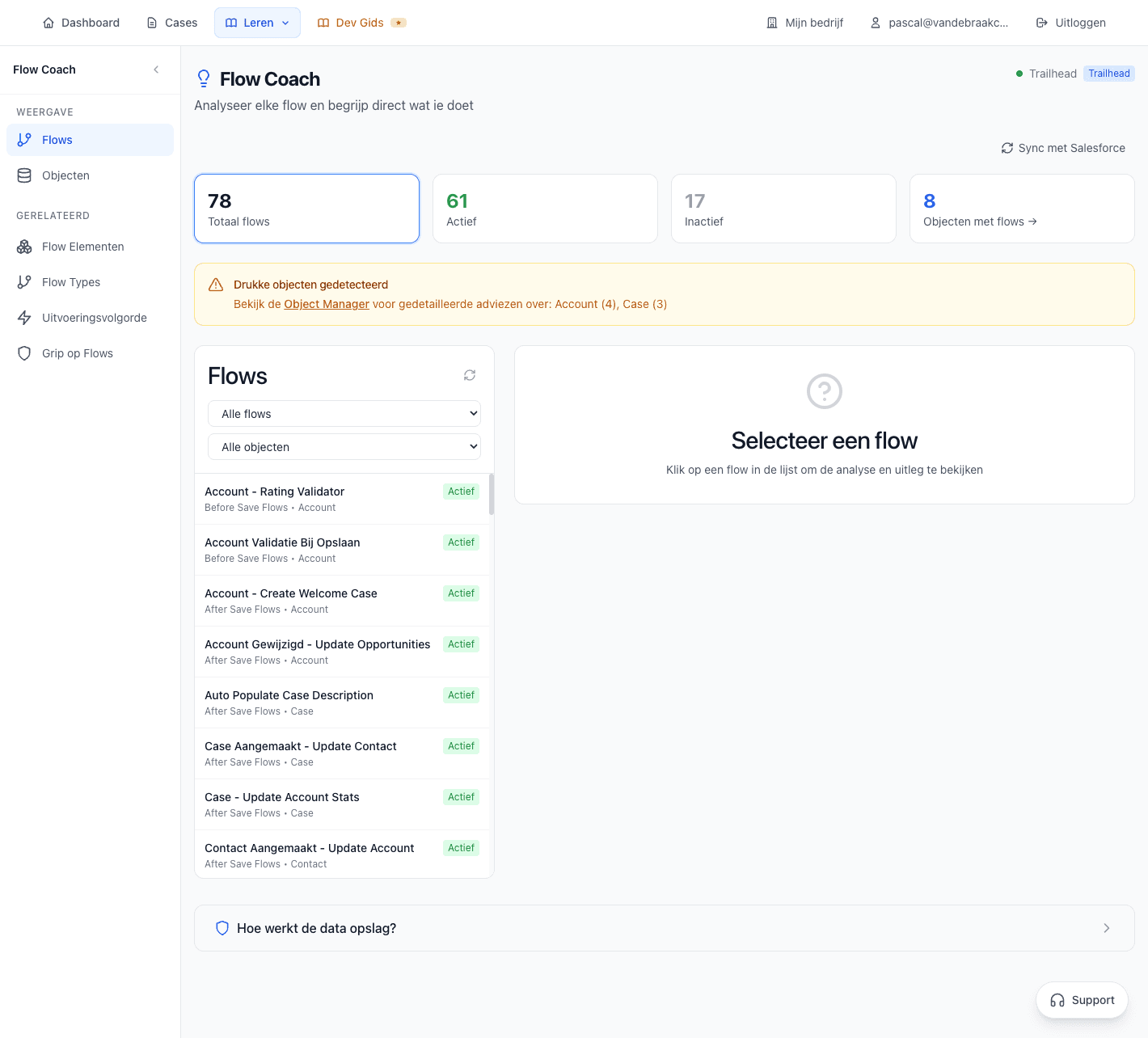
The Flow Coach overview shows all Flows in your org with type, status, and complexity score.
Statistics at a Glance
At the top of the screen, you immediately see the key figures of your Salesforce org:
Flow Analysis: Deep Insight Per Flow
Click on a Flow and you get a comprehensive analysis. This is where Flow Coach really becomes valuable: instead of clicking through the Flow Builder yourself, you immediately get a summary of what the Flow does.
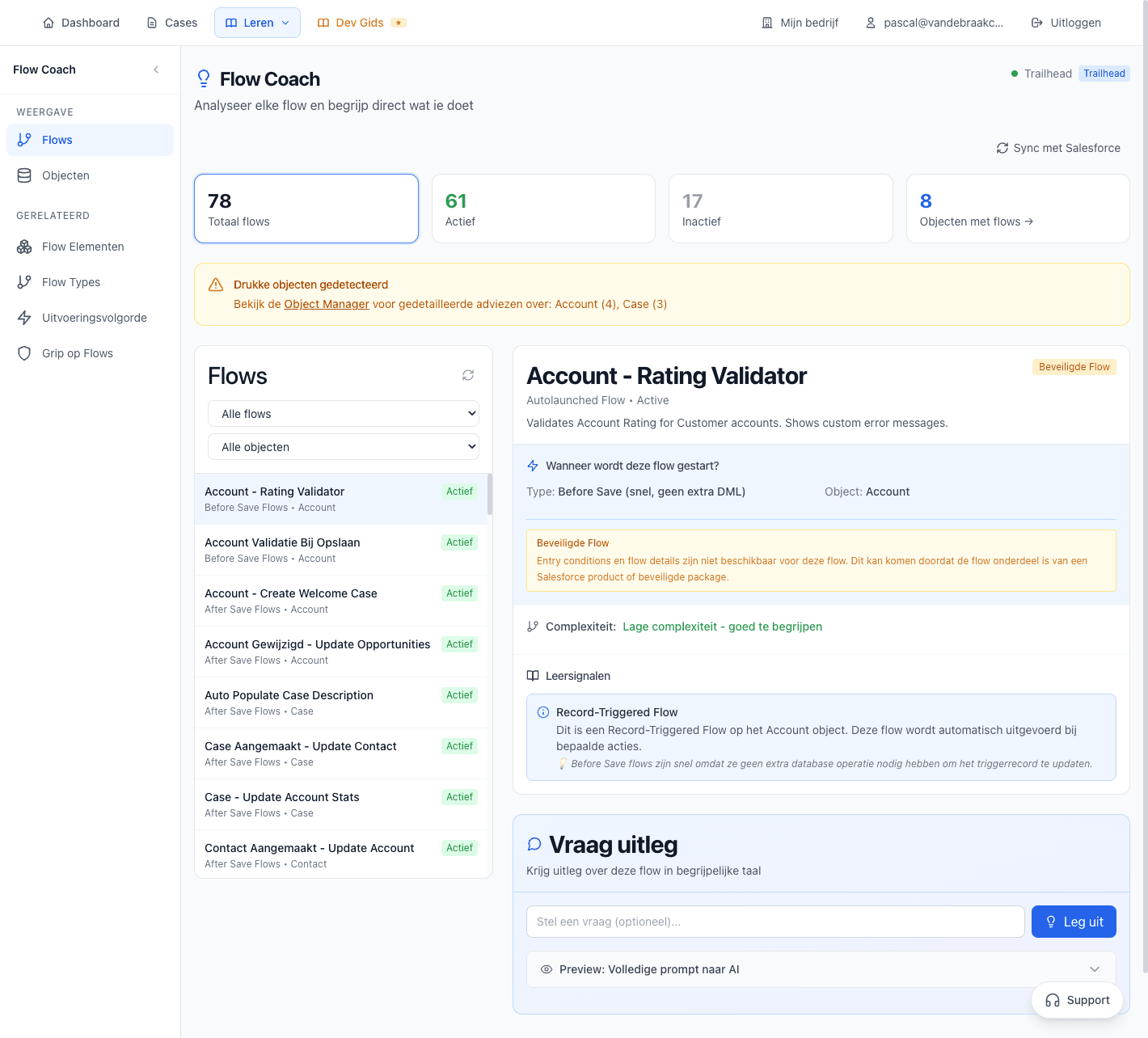
The Flow analysis shows complexity, learning signals, and a clear explanation of what the Flow does.
Flow Type
Record-Triggered, Screen Flow, Scheduled, Auto-launched or Platform Event. You immediately know which type of automation you're looking at.
Trigger Information
When is this Flow executed? When creating a record? On update? At a specific time? You see it immediately.
Complexity Score
A score from 1-10 indicating how complex the Flow is. Based on number of elements, branches, and subflows.
Learning Signals
Educational hints that help you understand what to watch for. Think of best practices, potential risks, and optimization opportunities.
Learning Signals: Learn While You Analyze
Learning signals are educational hints that Flow Coach adds to every analysis. They help you not only understand what the Flow does, but also how you could build or improve similar Flows yourself:
- "This Flow uses a subflow — this makes reuse easier but can make debugging harder"
- "Note: this Record-Triggered Flow runs Before Save, so it cannot retrieve records from other objects"
- "Tip: this Flow has many Decision elements — consider a Decision Table for better maintainability"
- "This Flow sends emails — check if this is desired for bulk operations"
The 'Ask for Explanation' Feature
Besides the automatic analysis, you can also ask your own questions about a Flow. Click 'Ask for Explanation' and you get an AI-generated explanation in understandable language. No technical jargon, but a story everyone understands.
You can also ask your own questions. For example:
- "What happens if the Account has no ContactPointEmail?"
- "Can this Flow end up in a loop?"
- "Why is a Platform Event used here instead of a direct update?"
- "What are the risks if I modify this Flow?"
The AI analyzes the Flow and gives an answer based on the actual configuration. No generic advice, but specific information about your Flow.
"Ask the question you would ask an experienced Salesforce consultant — but immediately, without waiting and without costs."
Privacy and Data Storage
We understand you're cautious about your Salesforce data. That's why we're fully transparent about what we do and don't store:
What We DO Store
- Metadata of your Flows: names, types, configuration
- Your analysis history within the platform
- Questions you ask via 'Ask for Explanation'
What We DON'T Store
- Customer data from your Salesforce records
- Personal data of your Salesforce users
- Passwords or sensitive credentials
The AI analysis works with metadata, not with your business data. We don't use your data to train AI models:
- Claude (Anthropic) is used for analysis — they don't store data for training
- Your Flow metadata is only processed, not permanently stored by the AI
- You can remove your connection at any time — then we also delete the metadata
Link to Flow Overview
Flow Coach focuses on individual Flow analysis. But if you want to structurally work on improving your Salesforce automations? Then Flow Overview is the next step.
Flow Overview builds on the insights from Flow Coach and helps you set goals for your automation landscape:
- Set learning goals per Flow or per category
- Track your progress with weekly check-ins
- Get personalized recommendations
- Document your findings and actions
Together, Flow Coach and Flow Overview form a complete system to go from reactive flow management to proactive Flow governance.
Have your Flows reviewed?
Salesforce in plain language. Finally.
- 14-day free trial
- No credit card required
- Expert support included
- Connect your Salesforce org instantly